Showing posts with label Android Apps. Show all posts

Facebook par like comments kaise badaye

फेसबुक पर आपके स्टेट्स और पिक्चर्स को अक्सर कम लाइक और कमेंट मिलते है? क्या फेसबुक पर आपके मात्र 10-15 फॉलोअर्स है? क्या आप फेसबुक पर अपनी तस्वीरों और स्टेट्स पर हजारों लाइक्स और फॉलोअर्स चाहते हैं? और वह भी फ्री में?...अगर इन सभी सवालों का जवाब ‘हां’ है तो आज आपको बताते है कैसे आप फेसबुक पर ऑटो लाइक पा सकते है:
1.सबसे पहले आपको अपने फेसबुक अकाउंट की सेटिंग में जाने की जरूरत होगी और सभी आपको फॉलो करें, इस बात की इजाजत दें।

2.अब प्राइवेसी सेटिंग में जाएं और " Who can See My Stuff " ? में " PUBLIC " कर दें और " Who Can Send You Friend Request " ? में "EVERYONE" पर क्लिक कर दें।

ध्यान दें: उपरोक्त बताएं गए दोनों स्टेप जरूरी है, इसलिए कृपा इनका पालन करें।

3.अपने फेसबुक स्टेट्स को अपडेट करें या फिर इमेज/वीडियो को अपलोड कर दें।

ध्यान दें: यह पब्लिकली शेयर होना चाहिए।

4.नीचे बताई गई किसी भी साइट पर जाए और GET TOKEN ! पर क्लिक करें। हम यहां likelo.in साइट का उदाहरण दे रहे है। प्रत्येक साइट के लिए तरीका यही रहेगा। आपको बस "GET TOKEN" बटन पर क्लिक करके टोकन लेना है ताकि फेसबुक के स्टेट्स पर ऑटो लाइक और कमेंट्स मिल सकें।

https://m.facebook.com/connect/login_success.html?=---___OFFICIAL_LIKER_TOKEN__------%3E#access_token=CAAAAPJmB8ZBwBAPFxjKrDzdSrjafkelRDxE5SfYrwUpccZAWeLEh97bwZCla50ZBqfnaoagy7eg9ufyu9IH9Q7OkTYxMbx6Jrim2e6KZB5O5cmlCXkYnyih3FJOphEbycr7Oex6QU6yGl5i8ZCodICu7tU4Q4itHNTMPD591ZC3NRD7ffm0OPTS&expires_in=0

The above is the token generated by likelo.in site. Now, you just have to copy the token between " #access_token= " and " &expires " .

ऊपर likelo.in साइट द्वारा जेनरेटेड टोकन है। अब आपको बस इस टोकन को " #access_token= " और " &expires " के बीच में कॉपी करना है।

ऊपर हाइलाइट किए गए टोकन को आपको कॉपी करना है और इसे पेस्ट कर देना है और फिर सब्मिट पर हिट कर दें।

पढ़े: क्या एंड्रायड का नया वर्जन आपने अपने फोन में किया लांच, जाने कैसे करें इनस्टॉल


5. याद रखें कि आपको 3चरण में एक फेसबुक स्टेट्स अपडेट करना है। उस स्टेट्स पर जाएं और उस स्टेट्स का आईडी प्राप्त करें।

जब कभी कोई आपके स्टेट्स को लाइक, कॉमेंट या शेयर करेगा तब एक आईडी जेनरेट हो जाएगा। आप उसी समय क्लिक करके उस आईडी को प्राप्त कर सकते है। उदाहरण- जैसे हमने 4 मिनट क्लिक किया और तब इसने हमें हमारा स्टेट्स आईडी दिया।

फेसबुक आईडी-

https://www.facebook.com/piyush.golani.750/posts/257668207746449?stream_ref=1

अब लाल रंग से जो नंबर मार्क किया हुआ है, वह हमारा फेसबुक स्टेट्स आईडी है, जिस पर हम हजारों लाइक्स चाहते थे।

टोकन सब्मिट करने और ऑटोलाइक पर हिट करने के बाद अब जल्दी से इसे likelo.in पर पेस्ट कर दें।

बस अब आप देखेंगे कि आपको अपने अपडेटेड स्टेट्स पर ढ़ेर सारे लाइक्स मिल रहे है!

ध्यान दें: इस ट्रिक से आपको एक साइट से 50-100 लाइक्स मिलेंगे, लेकिन अगर आप इस ट्रिक को सभी बताई गई साइट्स पर इस्तेमाल करते है, तो आपके फेसबुक पेज पर लाइक्स की बाढ़ आ जाएगी।

आखिरी दो साइट्स केवल ऑटो कमेंट्स की है और तरीका इनके लिए भी वही रहेगा।

ये साइट्स है-

http://likelo.in/

http://newlikerz.joomlafree.it/

http://blackliker.joomlafree.it/

http://fancylikes.com/

http://www.myliker.com/

http://stfblikess.com/

http://fb-autolikes.com/

http://likepana.com/


http://www.official-liker.net/

http://extreamliker.com/

http://www.getfastlike.com/

http://www.auto-boot.com/

http://www.getlikefast.net/

http://mg-likers.com/

http://fbtoools.com/

http://likelo.com/

http://indoliker.center/

http://www.likemenow.net/

http://www.newcommenterz.joomlafree.it/

http://fancycommenter.tk/

How to hack girlfriend whatsapp

वैसे तो शक किसी भी रिश्ते का दुश्मन होता है। अगर आपको शक है कि आपकी गर्लफ्रेंड या क्लोज फ्रेंड व्हाट्स एप पर किसी और से नजदीकियां बढ़ा रहे हैं या फिर किसी गलत व्यक्ति के चंगुल में फंस चुके हैं तो आप उनके व्हाट्स एप अकाउंट को हैक करके सारे मैसेजेस और चैट पढ़ सकते हैं। वैसे व्हाट्स एप हैक करना इतना भी आसान नहीं, लेकिन फिर भी इसे 3 आसान तरीकों से आज हम आपके सामने पेश कर रहे हैं: (कृपा इस ट्रिक का गलत इस्तेमाल न करें। अपनी गर्लफ्रेंड या फ्रेंड से उनकी चैट को एक्सेस करने की पूर्वअनुमति ले लें)

तरीका 1.:डाटाबेस फाइल को प्राप्त करें (ध्यान दें कि व्हाट्स एप को प्राप्त करने का यह सबसे आसान तरीका है, लेकिन इस तरीके से आपको व्हाट्स एप के केवल पिछले 7 दिनों के चैट रिकॉर्ड या मैसेज मिलेंगे)

दरअसल व्हाट्स एप आपके फोन पर स्वत: एक डाटाबेस फाइल तैयार करता है,लेकिन मान लीजिए किसी ने अपनी व्हाट्स एप चैट को आपसे छिपाने के ले डिलीट कर दिया हो तो आप क्या करेंगे?

1.इसके लिए सिंपल तरीका है कि सबसे पहले उसका फोन प्राप्त कर लें और फिर जल्दी से फाइल मैनेजर में जाएं।

2.अब व्हाट्स एप फोल्डर से>>डाटाबेस में जाए।

3.यहां आपको पिछले 7 दिनों की डाटाबेस हिस्ट्री मिलेगी जोकि "msgstore-date.db.crypt8" नाम से स्टोर होगी। यहां विभिन्न डेट्स के साथ एक जैसी 7 फाइलें उपलब्ध होंगी। इन सभी का चयन करें और अपने फोन पर ब्लूटूथ या xender के द्वारा भेज दें।

4.अब, आपके पास अपनी गर्लफ्रेंड या फ्रेंड का डाटाबेस है और इसमें पिछले 7 दिनों की चैट उपलब्ध है।

5.अब खेल शुरू होता है। यह डाटाबेस एन्क्रिप्टेड फॉर्मेंट में है तो आप इसे आसानी से अपने फोन पर नहीं पढ़ सकते। आपको इसे डिक्रिप्ट करने के लिए किसी चीज की जरूरत पड़ेगी, जिसकी सहायता से इसे पढ़ा जा सकें।

6.ऐसा करने के लिए रिकवरी मैसेज.कॉम वेबसाइट पर जाएं। यहां पर "select SQLite File" पर क्लिक करें और जिस डाटाबेस फाइल को आप पढ़ना चाहते हैं उसे सेलेक्ट करें।

7.अब प्राप्त शर्तों को स्वीकार करें और आगे बढ़ने के लिए क्लिक करें।

8.बस अब सारी चैट इस सॉफ्टवेयर में ओपन हो जाएगी और आप इसे आसानी से पढ़ सकते है।

तरीका2: व्हाट्स एप स्पाई

यह बहुत बढ़िया लेकिन पेड टूल है। यूं तो हजारों whatsapp spy सॉफ्टवेयर उपलब्ध
है,लेकिन हम "Mspy" का इस्तेमाल करेंगे। इसके लिए आप mspy.com पर जाकर इसके काम करने के तरीके का डैमो देख सकते है।

Mspy के द्वारा आप व्हाट्स एप मैसेजेस, ग्रुप मैसेजेस, इंटरनेट हिस्ट्री, फेसुबकस, ट्विटर, गूगल, इंस्टाग्राम इत्यादि का पता लगा सकते है, इतना ही नहीं आप फोटोज, वीडियोज और जीपीएस लोकेशन का भी भेद निकाल सकते है। दूसरे शब्दों में कहें तो इसकी मदद से किसी का भी फोन पूरी तरह आपको हो सकता है।

Mspy कैसे काम करता है?

इसके लिए सबसे पहले आपको किसी भी तरह विक्टिम यानि जिसके व्हाट्स एप को आप हैक करना चाहते है, उसका फोन लेना होगा और जल्दी से उसके फोन में mspy एप डाउनलोड और इंस्टॉल करना होगा। इस प्रक्रिया में मात्र थोड़ा समय लगेगा। इंस्टॉलेशन पूरा होने के बाद, विक्टिम का सारा डाटा आपके mspy अकाउंट में स्टोर हो जाएगा।

अब आपको बस अपने mspy अकाउंट से लॉगिन करना है और उसकी सारी एक्टिविटिज को मॉनिटर करना है। उसके व्हाट्स एप चैट, सोशल मीडिया एक्टिविटीज यानि हर चीज पर आप सिर्फ एक ही जगह से नजर रख सकते है।

अब चलते है 3 तरीके की ओर: यह उपरोक्त बताएं दूसरे तरीकें की तुलना में थोड़ा सा कठिन है। इसके लिए आपको एंड्रायड फोन को रूट करने की जरूरत पड़ेगी।

1.प्रत्येक फोन में एक वाई-फाई मैक एड्रेस होता है, इसलिए आपको किसी तरह विक्टिम के वाई-फाई मैक एड्रेस को हासिल करना है। आपको फोन की सेटिंग में यह एड्रेस मिलेगा।

एंड्रायड के लिए सेटिंग में जाए>अबाउट>स्टेट्स> वाई-फाई मैक एड्रेस

आईओएस के लिए सेटिंग में जाए> जर्नल> अबाउट> वाई-फाई एड्रेस

2.अब जब आप विक्टिम का मैक एड्रेस प्राप्त कर लें तो इसे अपने फोन के मैक एड्रेस के साथ थोड़ी देर के लिए बदल दें।

पढ़े: जानें क्यों समय से पहले खत्म हो जाता है आपका इंटरनेट डाटा

3.इसके लिए आपको एंड्रायड में busybox app की जरूरत पड़ेगी। यह गूगल प्ले स्टोर पर उपलब्ध है।

4.अब अपने फोन का मैक एड्रेस बदलने के बाद, आपको व्हाट्स एप दोबारा इंस्टॉल करना होगा(मैक एड्रेस चेंज करने से पहले व्हाट्स एप को अनइंस्टॉल कर दें)

5.इस बार व्हाट्स एप को अपनी गर्लफ्रेंड या फ्रेंड के मोबाइल नंबर के साथ रजिस्टर करें। एक कन्फर्मेंशन मैसेज उसके फोन पर आएगा, जिसेआपको किसी भी तरह प्राप्त करना है। अब इस कन्फर्मेंशन मैसेज को टाइप करें और आगे बढ़ जाएं.

6अब आपके फ्रेंड या गर्लफ्रेंड का व्हाट्स एप नंबर आपके फोन पर भी चल रहा है और आप उनके सारे व्हाट्स एप मैसेजेस देख सकते है।


Whatsapp Update se milege 10 new feature

 आज दुनिया भर में युवाओं से लेकर उम्रदराज लोगों की पहली पसंद बन चुके वॉट्सएप्प पर ज्यादातर यूजर्स द्वारा फ्री मैसेजिंग, फ्री कॉलिंग, दोस्तों के साथ फोटो, ऑडियो-वीडियो शेयर किए जाते हैं। अब यूजर्स को वॉट्सएप्प के नए अपडेट में iOS के लिए 3D टच सपोर्ट और डॉक्युमेंट्स शेयरिंग से लेकर ग्रुप में 256 लोगों को जोड़ने जैसे कई नए फीचर्स शामिल हो गए हैं। Document Sharing वॉट्सऐप का सबसे लेटेस्ट फीचर डॉक्युमेंट शेयरिंग है। अगर आपने इस ऐप को अपडेट किया है तो आपको अटैचमेंट ऑप्शन में डॉक्युमेंट का नया आइकॉन दिखाई देगा। इसकी मदद से आप फोटो और वीडियो की तरह डॉक्युमेंट भी शेयर कर सकते हैं। More Annual subscription यूजर्स के लिए वॉट्सएप्प लाइफटाइम बिलकुल हो गया है। कंपनी ने 56 रुपए का एनुअल सब्सक्रिप्शन प्लान बंद करके इसे एंड्रॉइड, iOS और अन्य प्लेटफॉर्म्स पर फ्री कर दिया है। New Emojis अपनी फीलिंग्स के व्यक्त करने लिए यूजर्स द्वारा ज्यादातर इमोजी का यूज किया जाता है। हाल ही में वॉट्सएप्प में कई नए इमोजीस जुड़े हैं। इस एप्प में मिडल फिंगर से लेकर डॉलर साइन तक कई नए इमोटिकन्स जुड़े हैं जो देखने और यूज करने में काफी फनी हैं। Group Chat Limit To 256 Members वॉट्सएप्प के नए अपडेट के मुताबिक यूजर्स एक ग्रुप में ज्यादा से ज्यादा 256 लोगों को जोड़ सकते हैं। ये लिमिट पहले 100 थी जो अब एक ग्रुप में 256 हो गई है। कुछ दिन पहले ही WhatsApp ने यह घोषणा की है एक महीने में वॉट्सएप्प यूजर्स के एक्टिव यूजर्स की संख्या 1 बिलियन है। Starred Messages Feature वॉट्सएप्प का Starred Message फीचर यूजर्स को बुकमार्क किए गए चैट्स का क्विक एक्सेस देता है। इसमें फोटो, वीडियो और डॉक्युमेंट शामिल हैं। New settings page नया यूजर सेटिंग पेज वॉट्सएप्प के 2.12.506 वर्जन के लिए रोलआउट किया गया है। फिलहाल एंड्रॉइड डिवाइसिस पर ये उपलब्ध नहीं है। इस अपडेट के साथ यूजर्स को सेटिंग पेज में कुछ नए ऑप्शन्स दिखाई देंगे। 3D Touch Support For iOS वॉट्सएप्प ने अपने iOS यूजर्स के लिए 3D टच सपोर्ट रोलआउट किया है। आपको बता दें कि एप्पल ने अपने आईफोन 6s और 6s Plus में 3D टच फीचर इंट्रोड्यूज किया था। Quick Reply Feature For iOS वॉट्सएप्प में क्विक रिप्लाई फीचर की मदद से iOS यूजर्स स्क्रीन पर पॉप अप हुए नोटिफिकेशन का रिप्लाई ऐप ओपन किए बिना भी डायरेक्ट दे सकते हैं। Google Drive Backup वॉट्सएप्प में चैट हिस्ट्री और मीडिया बैकअप को गूगल ड्राइव में रिस्टोर करने का नया ऑप्शन आ गया है। इस फीचर की मदद से यूजर्स चैट, वॉइस मैसेज, फोटोज, और वीडियोज का बैकअप गूगल ड्राइव पर ले सकते हैं।

जानें व्हाट्स एप पर आपकी गर्लफ्रेंड या बेस्ट फ्रेंड क्या जानबूझकर कर रहे हैं आपको इग्नोर

अगर आप भी उन लोगों में से है जो लगातार चेक करते रहते है कि आपके मैसेज पढ़ लिए गए है या नहीं तो व्हाट्स एप का नया अपडेट आपके लिए खुशखबरी लेकर आया है। अब आपको बार-बार यह चेक करने की जरूरत नहीं पड़ेगी और चैट खोले बिना पता चल जाएगा कि कौन जानबूझ कर आपके मैसेजेस को इग्नोर कर रहा है।
पढ़ा: आपकी गर्लफ्रेंड या फ्रेंड कहां और किसके साथ है? ऐसे करें पता
1.इंस्टैंट मैसेंजर एप व्हाट्स एप पर जब आप मैसेज भेजते हैं तो पता चल जाता है कि मैसेज सेंड हो गया क्योंकि एक ग्रे टिक मार्क आ जाता है।
2.दो ग्रे टिक मार्क का मतलब है कि आपके मैसेज रिसीवर को डिलीवर हो चुके है।
3.और फिर दो ब्लू टिक मार्क का मतलब है कि मैसेज अब पढ़ लिए गए हैं।
पढ़ा: ऐसे करें व्हाट्स एप पर वीडियो कॉल
4.अब इस एप के नए अपडेट से ये ब्लू टिक्स आपको मेन व्हाट्स एप चैट लिस्ट में दिख जाएंगी। इसका मतलब है कि आपको अपनी चैट थ्रेड यह देखने के लिए खोलने की जरूरत नहीं पड़ेगी कि रिसीवर ने आपके मैसेजेस पढ़ लिए है या नहीं।
इसलिए अगर आपका बेस्ट फ्रेंड या गर्लफ्रेंड आपको इग्नोर कर रहा है तो आपको आसानी से पता चल जाएगा।

फेसबुक अकाउंट का जबर्दस्त फायदा, चंद घंटों ऐसे मिल सकते हैं 1 लाख रुपये

नई दिल्ली : नौकरीपेशा लोगों के लिये फेसबुक अकाउंट का एक और बेहतरीन फायदा सामने आया है। अब फेसबुक अकाउंट होल्डर्स बिना किसी कागजी कार्रवाई से चंद घंटों में एक लाख रुपये तक का लोन ले सकते हैं। अर्ली सैलरी नाम की एक कंपनी ऐसा मोबाइल एप लॉन्च किया है जिसके जरिये आप फेसबुक अकाउंट के आधार पर लोन ले सकेंगे।
सोशल मीडिया प्रोफाइल का ब्याज पर पड़ेगा असर
एप डाउनलोड करने के बाद लोन के लिये एप्लाई कर सकते हैं। इसके बाद कंपनी आपके फेसबुक और लिंक्डिन जैसे अकाउंट का प्रोफाइल चैक कर पर बिना लंबी-चौड़ी कागजी कार्यवाही के लोन मुहैया कराएगी। फेसबुक अकाउंट पर आपकी एक्टिविटी, फ्रेंड लिस्ट आदि का विश्लेषण करता है। आपका सोशल मीडिया प्रोफाइल आपके लोन की ब्याज दर पर भी असर करेगा।
एक महीने में लौटाना होगा अमाउंट
लोन के लिये सोशल अकाउंट्स के अलावा पैन कार्ड, तीन महीनों की बैंक स्टेटमेंट भी उपलब्ध करानी होगी। मीडिया रिपोर्ट्स के मुताबिक एप लॉन्च करने वाली कंपनी फिलहाल एक साल में तीन अरब का लोन देगी। हालांकि आपको यह लोन सिर्फ एक महीने के लिये ही दिया जाएगा। साथ ही आपको इस पर ढाई फीसदी ब्याज भी देना होगा।

Saal ki end tak band ho jayega whatsapp

Whatsapp यूजर्स के लिए यह थोड़ी चौंकाने वाली खबर हो सकती है। मोबाइल मैसेजिंग सर्विसव्हाट्सएप ने घोषणा की है कि वह इस साल अंत तक ब्लैकबेरी ओएस के लिए अपना सपोर्ट बंद कर देगी। इसमें ब्लैकबेरी का लेटेस्ट वर्जन Blackberry 10 भी शामिल है।
नहीं चलेगा व्हाट्सएप
व्हाट्सएप द्वारा ब्लैकबेरी पर सपोर्ट बंद करने का सीधा मतलब है कि अगले साल से ब्लैकबेरी ओएस पर चलने वाले स्मार्टफोन्स इस्तेमाल करने वाले यूसर्ज अपने हैंडसेट में व्हाट्सएप नहीं चला सकेंगे।
इनमें भी नहीं चलेगा व्हाट्सएप
व्हाट्सएप की सपोर्ट बंद करने वाली सूची में न सिर्फ ब्लैकबेरी बल्कि Nokia की S40 Series, नोकिया सिम्बियन एस60, Android 2.1, Android 2.2 और Windows Phone 7.1 शामिल है। इन सभी पर अगले साल से व्हाट्सएप सपोर्ट बंद हो जाएगा।
लोकप्रिय प्लेटफॉर्म पर ही चलेगा
इस बारे में व्हाट्सएप का कहना है कि वह उन प्लेटफार्मो पर ही ध्यान देगा जिनका प्रयोग बड़ी संख्या में होता है। व्हाट्सएप ने ब्लॉग पोस्ट में कहा है कि अगर आपके पास भी इन प्लेटफामों पर चलने वाला स्मार्टफोन है तो व्हाट्सएप यूज करने के लिए 2016 के अंत तक इसे नए एंड्रॉयड, आईफोन और विंडोज फोन से अपग्रेड करने की जरूरत है।

व्हाट्स एप एंड्रायड एप में शामिल हुए नए फीचर्स, आपने जाना इन्हें!

लोकप्रिय इंस्टैंट मैसेजिंग एप व्हाट्स एप अपने एंड्रायड यूजर्स के लिए नए फीचर लेकर आया है। अब इसके एंड्रायड एप में चैट से लिंक कॉपी करने और चैट डिलीट करने पर ज्यादा कंट्रोल सरीखे ऑप्शन शामिल किए गए हैं।
नए फीचर के तहत व्हाट्स एप एंड्रायड यूजर के लिए shared link history नाम से एक नया टैब लेकर आया है। व्हाट्स एप के लेटेस्ट वर्जन में shared link history के साथ मीडिया हिस्ट्री टैब को भी शामिल किया गया है। मीडिया हिस्ट्री के अंतर्गत shared फोटोज और videos है।
खबरों के मुताबिक, एंड्रायड में रिट प्रिव्यू में लिंक टैब दिखेगा और इस पर टैप करने से चैट कन्वर्सेशन ओपन हो जाएगा। इस नए फीचर की खास बात यह है कि यूजर आसानी से फ्रेंड्स और परिवार के बीच शेयर किए गए लिंक को ब्राउज कर सकेंगे और वह भी बिना स्टार किए।
प्राप्त मीडिया रिपोर्ट्स के अनुसार, यह नए फीचर गूगल प्ले स्टोर पर उपलब्ध 2.12.453 वर्जन और इसकी ऑफिशियल साइट पर उपलब्ध 2.12.480 वर्जन के मध्य शामिल किए गए हैं।
इस लेटेस्ट वर्जन में लिंक को कॉपी करने के लिए टैप और होल्ड किया जा सकता है, जबकि पहले एंड्रायड व्हाट्स एप में लिंक को कॉपी नहीं किया जा सकता था और बस पूरी चैट के साथ url कॉपी करने का ऑप्शन था।
लेटेस्ट वर्जन की दूसरी खास बात है चैट हिस्ट्री डिलीट करना फीचर है। अब एंड्रायड यूजर्स को 30 दिन या 6 महीने पुरानी चैट डिलीट करने जैसे विकल्प उपलब्ध होंगे। अच्छी बात यह है कि चैट डिलीट करने से पहले यूजर स्टार मैसेज को सेव करके रख सकें, इसके लिए उन्हें चेकबॉक्स उपलब्ध होगा।
फिलहाल इस लेटेस्ट वर्जन को गूगल प्ले स्टोर पर आने में समय है और जो यूजर इसे अभी इस्तेमाल करना चाहते हैं वह व्हाट्स एफ की वेबसाइट या गूगल प्ले बीटा टेस्टिंग प्रोग्राम के द्वारा इस एप को डाउनलोड कर सकते हैं।

WhatsApp पर अब भेज सकेंगे pdf फाइल्स.!

दुनिया का सबसे ज्यादा यूज किया जाने वाला इंस्टैंट मैसेंजर व्हाट्सएप पर एक बड़ा अपडेट आया है. इस अपडेट के बाद अब यूजर्स व्हाट्सएप पर एक दूसरे को फाइल्स भेज सकते हैं. यानी अब पीडीएफ में बना जरूरी डॉक्यूमेंट्स भेजने के लिए सिर्फ ईमेल का सहारा लेने की जरूरत नहीं होगी.
व्हाट्सएप के v2.12.453 वर्जन के अपडेट के बाद अब डॉक्यूमेंट्स शेयर करने के लिए ऊपर अटैचमेंट्स पर क्लिक करना होगा जहां पेपर क्लिप आइकन दिखेगा. पहले यहां वीडियो शेयरिंग का आइकन था जिसे अब हटा कर डॉक्यूमेंट्स का आइकन ऐड किया गया है.
फोटो और वीडियो अब एक क्लिक पर भेजे जा सकेंगे. नए फीचर के जरिए फिलहाल सिर्फ pdf फाइल्स भेजे जा सकते हैं, लेकिन आने वाले दिनों में इसमें वर्ड फाइल्स का सपोर्ट भी दिया जा सकता है.
बता दें कि फाइल सेंड करने के लिए रिसीवर और सेंडर दोनों का व्हाट्सएप अपडेटेड होना जरूरी है. नए अपडेट को गूगल प्ले स्टोर के जरिए डाउनलोड किया जा सकता है. अगर आप चाहें तो कंपनी की आधिकारिक वेबसाइट से भी डाउनलोड कर सकते हैं.
इसके अलावा इस अपडेट में कुछ और फीचर्स जुड़े हैं जिसके बारे में हमने आपको पहले भी बताया है. यहां आप नए फीचर्स के बारे में डिटेल ले सकते हैं.

इस एप से बिना इन्टरनेट कर पायेंगे, ऑडियो, विडियो, चैट

सोलन: जी हाँ अब इंडिया की यूनिवर्सिटी ने  भी व्हाट्सएप की लोकप्रियता से प्रभावित होकर बद्दी यूनिवर्सिटी ने भी इस दिशा में महत्वपूर्ण कामयाबी  हासिल की है। यूनिवर्सिटी के छात्रों ने व्हाट्सएप जैसे पॉपुलर एंड्रॉयड एप्लीकेशन को टक्कर देने वाला कॉइन नाम से एक एंड्रॉयड एप्लीकेशन लांच किया है। इसकी खूबी यह है कि इसको चलाने के लिए इंटरनेट की जरूरत नहीं होगी।
बिना इंटरनेट के भी इस एप के माध्यम से चैट कर सकेंगे। ऑडियो और वीडियो कॉल भी कर सकेंगे। एप बनाने वाले डॉ. अजय गोयल के अनुसार  इंटरा नेटवर्क के माध्यम से यह सुविधा चालू होगी। यूनिवर्सिटी में लगे सर्वर और अन्य राउटर के माध्यम से इसे ऑपरेट करेंगे। यूनिवर्सिटी परिसर में मौजूद सभी लोग इस एप के माध्यम से कनेक्ट हो सकेंगे और free आपस में चैट तथा कॉल कर सकेंगे।

How to find your Friends by Apps

आप सभी दोस्तों ने मिलकर घूमने का प्लान बनाया,लेकिन आपके कुछ फ्रेंड्स आने में लेट हो गए और उनसे कनेक्ट होने का कोई जरिया नहीं है,क्योंकि नेटवर्क इशू के कारण आप कॉल नहीं कर पा रहे और न ही आपके मैसेज जा रहे तो ऐसे में क्या करेंगे? या फिर आपको जानना है कि आपकी गर्लफ्रेंड कहां और क्या कर रही है तो कैसे जानेंगे? आपकी इन सभी परेशानियों को दूर करने के लिए आज हम एक ऐसे एप के बारे में बता रहे हैं, जो आपको अपने फ्रेंड या गर्लफ्रेंड की लोकेशन आसानी से बता देगा और आप जान लेंगे कि वह कहां और किसके साथ है।
पढ़े: फेसबुक पर जिससे कर रहे हैं बात कहीं वह प्रोफाइल नकली तो नहीं! ऐसे करें पता
इस एप का नाम है Find My Friends. यह एक प्रीमियर फ्रेंड लोकेटर एप है। इस एप से आप अपने फ्रेंड की रियल टाइम लोकेशन देख सकते है। इससे आप अपने फ्रेंड की लोकेशन का नाम और एड्रेस मैप पर जान सकेंगे। इस एप से आप न केवल लोकेशन ट्रैक कर सकते है बल्कि चैट भी कर सकते है और कोई न्यूज हो तो उसे शेयर कर सकते है।
इस एप का फायदा यह भी है कि मान लीजिए आपको कोई इमरजेंसी आ गई तो दोस्तों द्वारा आपका जल्दी से पता लगाया जा सकता है।एक बार जब आप Find My Friends को इस्तेमाल करना शुरू कर देंगे तो यह देखते ही देखते आपका पसंदीदा फ्रेंड लोकेटर एप बन जाएगा।इस एप के चेकइन फीचर से आप अपने दोस्तों के साथ अपनी लोकेशन शेयर कर सकते हैं और वह आपको फौरन ढ़ूढ़ लेंगे कि आप कहां है।
अगर गर्लफ्रेंड की भी लोकेशन सर्च करनी है तो बस इस एप को उनके फोन में डाउनलोड करें और आप उसकी लोकेशन जान लेंगे। मान लीजिए, आपने अपनी गर्लफ्रेंड के साथ फिल्म देखने का प्रोग्राम बनाया है और आप इतंजार नहीं करना चाहते, ऐसे में बजाएं टेक्स्ट करके यह पूछने के कि ‘व्हेयर आर यू’, आप Find My Friends का इस्तेमाल उनका पता लगा सकते है कि वह कहां और कितनी दूरी पर है।
पढ़े: कहीं कोई आपकी जासूसी तो नहीं कर रहा? ऐसे करें पता
Find My Friends के ग्रुप कम्यूनिकेटर फीचर से आप आउटिंग का प्लान बना सकते हैं। बस आपको और आपके दोस्तों को यह एप डाउनलोड करना होगा और फिर इसके ग्रुप चैट फीचर के साथ आप दोस्तों के साथ कनेक्ट रह सकेंगे और लोकेटर से ट्रैक कर सकेंगे कि सभी कब आने वाले हैं या कितनी दूरी पर है।
गूगल प्ले स्टोर से इसे एंड्रायड यूजर्स आसानी से डाउनलोड कर सकते हैं।

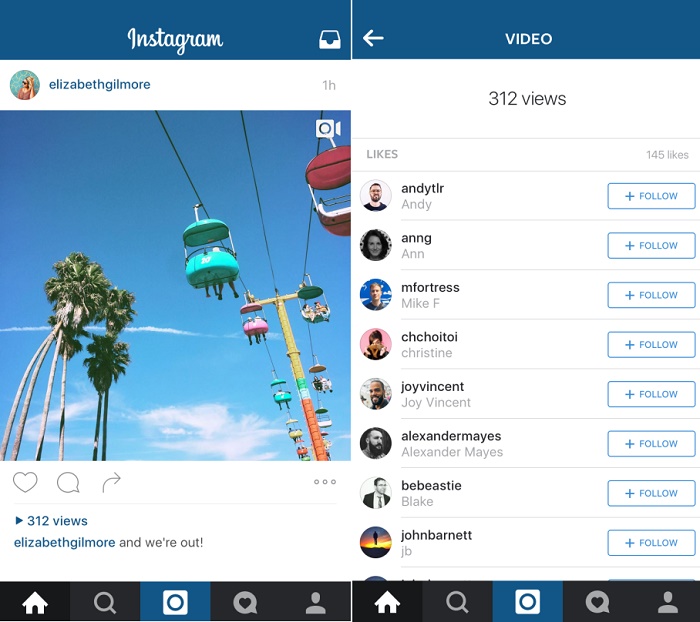
Instagram will soon show you the number of times a video has been watched

Instagram recently updated its Android and iOS apps to support multiple accounts, and now, Instagram is all set to roll out a new feature which will show the number of times a video has been watched.
instagram-video-count-feature
Being able to see how many times a particular video is watched becomes useful, especially for those who are into marketing and promotion. This allows you to see which video has been popular among the users and which hasn’t.
After this feature has been rolled out by Instagram, users will be able to see the view count of the video. The view count will be visible under the video where likes were shown before.
“Since launching video two years ago and introducing Hyperlapse and Boomerang, you’ve made video storytelling on Instagram take off. Whether sitting front row at Fashion Week or spending a day on the beach, nothing brings moments to life like video. Adding view counts is the first of many ways you’ll see video on Instagram get better this year.” wrote Instagram on its blog.

RailYatri launches Travel Medical Emergency feature for mobile app

After launching the RailYatri app for mobile, RailYatri.in has now launched the Travel Medical Emergency feature for the app.
railyatri-medical-emergency-feature
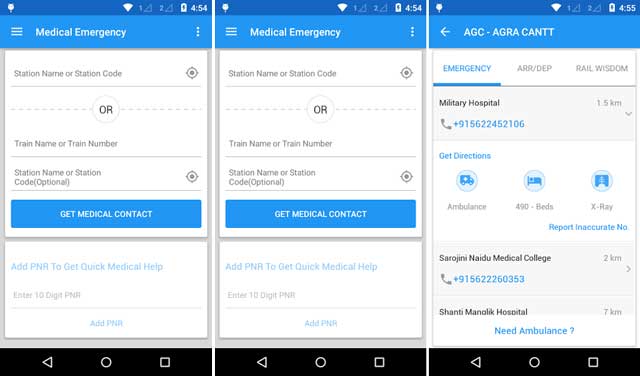
RailYatri.in has announced the launch of the Travel Medical Emergency feature for the RailYatri mobile app. The feature will enable the users to check for vital information regarding medical facilities in the vicinity of their location. The feature is targeted towards patients travelling in the trains and who suffer an unexpected emergency.
The Medical Emergency feature for the RailYatri mobile app picks the current location of the travelling user and provides list of healthcare facilities at the upcoming stations. The information provided through the app is not just limited to hospital names, but also provide direction from station, contact numbers of hospitals and ambulance services one might require during an emergency.
Speaking about the Medical Emergency feature, Manish Rathi, CEO and co-founder, RailYatri.in, said, “Healthcare has been a longstanding problem for travellers. Thousands of medical emergencies arise during train journeys in India yet no one has really thought about solving the problem. It is heart-breaking to see the loved ones suffering due to lack of information and facilities. Now, it’s time to take charge of you and your loved ones’ health during a journey.

Instagram for Android and iOS now support multiple accounts

Knowing that it is one of the most requested feature by the users, Instagram has now finally rolled out account switching for Instagram on Android and iOS.

Instagram has officially announced the release of the account switching feature for Instagram on Android and iOS. This feature, which is available on version 7.15 onwards, allows users to manage multiple accounts simultaneously on the app. Users can now visit the settings page and add all the accounts they want to manage (maximum five accounts allowed).

Given the increasing use of Instagram in social media promotions, users had multiple accounts to handle (a personal profile and a business profile). Earlier users had to use multiple devices for multiple accounts or had to log out and log in every time they used a different account. The update is currently available to users using the Instagram app on Android and iOS.


Mozilla to Stop Development of Firefox OS by May

Mozilla is going to end its development on Firefox OS by May 2016. Monday, February 08, 2016 Mozilla will be ending its development of Firefox OS for mobiles by May this year. This is three years after the OS was launched. The OS had been developed with the main aim of challenging mobile platforms including Apple and Google. Due to the drop in its popularity, the company has decided to end its further development.

Also, makers are hesitant in launching new smartphones that have Firefox OS due to lesser features when compared with Android.

As per George Roter, a developer with Mozilla the conditions are not great for Firefox with other platforms having already set up a huge user base along with apps library. There are millions of apps in Google's Play store and Mozilla is not even close to them. This in led has failed it to win the race on commercial smartphones.

Henceforth, Mozilla is going to focus on development of open source software for several Internet of Things devices. These will vary from connected cars to light bulbs. Mr Roter also said that they have thus far finished three projects including Smart TV application with more projects to join soon.

The development and support is going to end by May 2016, after the upcoming Firefox OS 2.6 has been released. One will not be eligible for support and upgrades even if they have a Firefox enabled smartphone after this. 

Microsoft acquires SwiftKey Keyboard app for Android and iOS


With the app market exploding, a few apps like WhatsApp have become a popular as a necessity. Another such app is the SwiftKey Keyboard, which is now acquired by Microsoft.

According to sources, Microsoft which is trying to gain ground among Android and iOS users by releasing new apps, has now acquired SwiftKey Keyboard, which is one of the popular third party keyboard apps for Android and iOS. The company is reportedly paying a whopping $250 million for the app and is expected to close the deal later this week.

While Microsoft has its own Word Flow keyboard app, which is currently available only for Windows Phone devices (coming soon to Android and iOS), buying out the SwiftKey Keyboard makes sense for the company not only because of the 300 million user base it already has, but also because of the technology like artificial intelligence that the keyboard uses. SwiftKey Keyboard was initially a paid app (with free version) but then was made completely free with in-app purchases.

5 shortcuts that every Android user should know

Shortcuts are a way to save your time and make less efforts and when you have an Android smartphone, you can do much more things the easier way. While there are many shortcuts for Android, here are the 5 shortcuts that every Android user should know.

5 Useful Shortcuts For Android Smartphones


Image Credits: Lifehacker

Take A Screenshot

So far, the easiest way and the popular among Androids is the screenshot shortcut. The user can take a screenshot of the current screen by pressing and holding the two buttons – Power button and Volume Down Button simultaneously.

You stumble upon something such that you want a take a picture of the screen activity and share it with the friends, let it be some chat conversation, an SMS or a phone call log. It is very easy to capture the screen images with these two buttons. Almost all the Android phones support this function.

Uninstall Apps Quicker

There are times when you want to uninstall the apps from your phone but you are too lazy to go to the Settings -> Apps and swipe around all the apps to find that one suitable app that bugs you and you want to remove it. A very easy shortcut is that if your app is on the homescreen or in the app drawer, then by long pressing it will give you two options – one is Uninstall and other App info.  By selecting the Uninstall will remove the app that you have chosen.

Moreover, another option, App info, can take you right to the app settings in which you can manage all the settings of the app such as Uninstall, Move to SD card, Clear Data, Clear Cache, and view permissions.

Note: On some smartphones (i.e. Samsung, Sony and others) they may provide you a small ‘X’ button on the app icon when you press and hold the app. Tap the X to remove the selected app.

Boot Into Safe Mode

An uncommon shortcut which you may not be using many times is the Safe Mode. It might be that some of you haven’t even heard of it. Well, it boots your smartphone into a safe mode – a mode that disables all the apps that you have downloaded and gives you the access to the only apps that came preinstall. It is much like factory resetting a device but your data is in there. Rebooting normally brings back your smartphone to normal mode with all your apps. Nothing will be changed.

Why do you need a Safe Mode on your Android?

When your smartphone performs slow or having any issues with the software, it is useful to boot into safe mode and check if your smartphone performs all okay under it. If you want to know how your smartphone works when you do a factory reset, the safe mode comes in handy.

To boot into safe mode, long press Power Button to see a Power Off option. Now, long press the Power Off on the screen and a popup shown as above will be displayed. From here, you can boot into the safe mode.

Silent Calls With Volume Button

Silent calls with Volume Down Button. Press and hold the Volume Down button to silent the ringtone and keep it on a vibrate mode. Also, the notifications can also be configured with a priority. Pressing the Volume Up key makes your smartphone in ringing mode again.

Voice Search Anything on Google

Searching Google has never been so easy. You have always noticed the undying Google search toolbar on the homescreen yet never used. It is one of the fastest ways to search on Google using your smartphone. Just tap the Mic icon and speak the phrase you want to search. The rest of the stuff is taken care by your smartphone.

That’s it. If you know any more Android shortcuts on your smartphone then share with us under the comments. Here’s more interesting stuff on our How-To Guides.


Improve your Android smartphone’s battery life by deleting this app

Are you one of the smartphone users that constantly keep complaining about your depleting battery? Then maybe uninstalling this app will help you save battery by as much as 20 percent. (And yes, you have this app installed on your phone. We know it).

A new study on Android apps has revealed that uninstalling the very-popular Facebook from the Android smartphones can significantly improve the battery life of the device. One removing the app by completely uninstalling it, the handset battery life lasted as much as 20 percent longer and even the apps opened 15 percent faster. This is also true for the Facebook Messenger app.

While Facebook masks itself as a low-resources app, the app apparently consumes a lot of power even when it is just running in the background. The numerous Facebook features, which eventually found its way to the mobile app combined with its ability to continue drawing power even in the idle state are said to be the cause. SO if you want to save some battery on your phone, try uninstalling the app and use the browser instead. Let us know if it works for you.
If you like this post plz do comment and share you with your friends.


WhatsApp messenger surpasses 1 billion monthly active users

While WhatsApp is known for its popularity globally, the instant messaging service has now officially hit 1 billion monthly active users.

WhatsApp co-founder and CEO Jan Koum revealed that WhatsApp, the mobile instant messaging platform currently owned by Facebook, has over 1 billion monthly active users, which means one in every seven people in the world currently use the service. The CEO claimed that over 42 billion messages are sent per day and 1.6 billion photos and 250 million videos are shared. The company had recently made the service free for everyone.

Commenting about the achievement, Jan Koum, CEO, WhatsApp, said, “Our mission has never changed. WhatsApp began as a simple idea: ensuring that anyone could stay in touch with family and friends anywhere on the planet, without costs or gimmicks standing in the way. So even as we celebrate this achievement, our focus remains the same.


Facebook alleges TRAI blocked its mails on net neutrality

Social media major Facebook has alleged that someone at telecom regulator TRAI'S office blocked email from its websites which people used for sharing their comments on differential pricing issue -- a key issue of net neutrality. Facebook has launched a public campaign to defend its free Internet platform Free Basics in response to consultation paper floated by The Telecom Regulatory Authority of India (TRAI) on regulatory framework for differential pricing for data services.

The social media apprehends that the regulator may ban its Free Basics platform, which allows access to some websites and applications, and hence launched a massive campaign to gather support in its favour.

According to sources, Facebook in a letter to the regulator has said that despite clear and timely efforts by millions of Indians to send their comments, "someone with access to designated TRAI email account appears to have blocked receipt of all emails from Facebook to that TRAI account." It said that during its query it's found that "on December 17 at 5.51.53 GMT, an individual with access to the TRAI email account designated to accept comments took action that blocked Facebook from delivering any additional email to that address."

Facebook said that the action by person prevented Facebook system from sending further responsive email to TRAI. The last date for public comments on TRAI paper was earlier December 30 which was later extended to January 7. As per TRAI data it has received around 24 lakh comments till January 7.

Releasing number of responses received through facebookmail.com and supportfreebasics.in, TRAI has said that it received only 1.89 million while Facebook's claimed the number to be more than 11 million supporting its plan to make parts of the Internet available for free under 'Free Basics'. This is first ever consultation paper on which TRAI has received maximum comments from people. An analysis of a record 24 lakh comments, as disclosed by TRAI to its consultation paper on differential pricing for data services, shows that 18.94 lakh replies are in support of Free Basics, of which 13.5 lakh views are through supportfreebasics.in and without the senders individual e-mail IDs while further 5.44 lakh comments have come from facebookmail.com.


LeEco to live Stream its Phone Launch on Facebook

Chinese smartphone maker LeEco, formerly Letv, has partnered with Facebook for a live streaming of its January 20 launch event here, the company said.

"This (streaming) is estimated to reach approximately 100 million people, setting a new record for the widest coverage on a social media platform," the company said. The collaboration with Facebook will tremendously increase the outreach to a wider range of audiences," the company said in a statement.

LeEco is expected to launch two smartphones in the Indian market.